
CRM for SAP Business One: Give Sales, Service & Finance a Single Source of Truth
SAP Business One is a great ERP - but it was never built to run a modern sales, service, and collections team. Here's how the right CRM for SAP Business One fixes that, without replacing your ERP.
If your business runs on SAP Business One (often written SAP B1, or SAP Business 1), you already have a solid ERP - but its built-in CRM was never designed to carry a modern sales, service, and collections team. The fix isn't to rip out SAP B1. It's to connect a purpose-built CRM for SAP Business One that syncs both ways: a prospect entered by sales becomes a customer in SAP automatically, a won deal becomes a sales order automatically, and finance and sales finally work from one set of numbers. No double entry. No duplicate masters. One source of truth.
SAP Business One is an excellent ERP
Let's be clear up front: SAP Business One is one of the best ERP platforms a small or mid-sized business can run on. It centralises finance, purchasing, inventory, and production in a single, reliable system of record. Your general ledger, accounts receivable and payable, item master, bills of material, stock movements, and invoicing - SAP B1 handles the hard, mission-critical work of running a business, and it does it well.
For anything to do with money, inventory, and the master item catalogue, SAP Business One should stay the system of record. That's not the problem. The problem shows up the moment you ask that same system to run the day-to-day life of a front-line sales, service, or collections team.
Where SAP Business One's built-in CRM runs out of road
SAP Business One does include a native CRM module - contacts, activities, opportunities, and basic service. On paper it looks like a CRM. In daily use, though, it was built as a feature inside an accounting system, not as a tool a field rep, service engineer, or collections agent actually wants to open. Here is why teams consistently find it isn't enough.
Field sales & key accounts
Reps live in the field, on their phones. The native module is desk-bound and form-heavy - no easy mobile-first way to plan visits, score leads, or track sales velocity.
Service, warranty & AMC
Managing warranties, AMCs, renewals, and service tickets end-to-end with SLAs and ownership isn't what an ERP was designed for - so renewals and post-sale revenue quietly slip.
Receivables & collections
SAP B1 records the invoice perfectly. What it can't do is help a team actively chase and collect - capture milestones, assign follow-ups, and drive down DSO.
The specific reasons the native CRM isn't enough
It's worth being concrete, because "it's not great" isn't a reason a business leader can act on. These are the gaps SAP Business One users run into again and again:
Built for forms, not for people
The interface is designed around accounting screens and multiple fields. Reps have to click through several windows to log a single visit - so they delay it, do it after hours, or skip it entirely. Data that never gets entered can't help anyone.
Weak on mobile and field work
Modern B2B selling happens on the road - between meetings, at a customer site, right after a service call. Native ERP CRM offers a limited mobile experience, so the moment a rep leaves their desk, the system stops keeping up with them.
Thin sales intelligence
There's no natural way to score and qualify leads, weight the pipeline, or measure sales velocity (deal value, win rate, sales-cycle length). Managers get lists and static reports, not the guidance a sales team needs to prioritise.
No real service lifecycle
Warranties, AMCs, renewals, service tickets and SLAs need their own workflow with reminders and ownership. When that lives in spreadsheets alongside the ERP, contracts expire unnoticed and renewal revenue leaks.
No active collections engine
SAP B1 tells you what's outstanding; it doesn't help you collect it. There's no home to capture payment milestones, assign collection activities to owners, follow up systematically, and drive Days Sales Outstanding (DSO) down. That's a relationship-and-activity problem - a CRM problem sitting inside a ledger.
Customisation needs consultants
Bending native ERP CRM to a real sales or service process usually means technical configuration and specialist help - time and cost most SMBs would rather not spend just to make a CRM usable.
The pattern is consistent: SAP Business One is a superb system of record, but a limited system of engagement. That distinction is the whole reason this article exists.
Why "best-of-breed" beats "all-in-one"
There are two ways to close the gap. One says "make the ERP do everything." The other - the one that actually works for growing SMBs - says use the best tool for each job and connect them cleanly. Keep SAP Business One as your rock-solid financial and inventory backbone. Add a CRM purpose-built for client-facing teams across sales, service, field operations, and receivables. Then integrate the two so tightly your people never notice a seam.
SAP Business One
Your system of record - finance, inventory, item master, invoicing. Keep it. It's the backbone.
HappSales CRM
Your system of engagement - sales, service, field ops, and collections your team will actually use.
This best-of-breed approach works on one condition: the integration has to be bi-directional and automatic. If your team is copying customer names from one system into the other, you haven't solved the problem - you've added a second one.
What a single source of truth actually means
In one line: a single source of truth means every customer, order, and item exists once, is created once, and stays consistent across both systems - because they're synced, not re-typed.
Picture the alternative, which is how most SAP B1 shops run before integrating a CRM. Sales captures a prospect. The deal closes. Now someone on the SAP team manually creates that customer as a Business Partner - retyping the company name, address, contact, and currency. Finance raises the invoice. Then someone updates a separate collections tracker. The same customer now lives in three places, spelled three different ways, with three versions of "what's outstanding." That's not a data problem; it's a trust problem - every meeting starts with reconciliation instead of decisions.
A properly integrated CRM for SAP Business One removes that entirely. Masters are shared. Records are created once. Data flows both ways. No duplication of effort, no duplicate records, no arguments about whose spreadsheet is right.
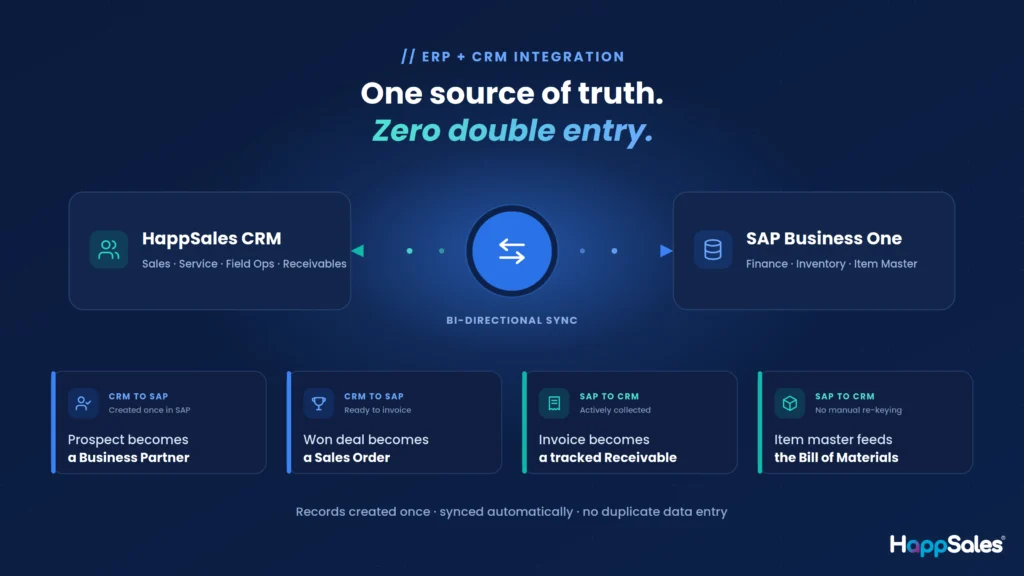
Bi-directional sync - customers, orders, invoices and item masters stay aligned on both sides, automatically.
HappSales + SAP Business One: 4 automated flows
You don't need to understand the plumbing - what matters is what the integration does. Here are the four flows that eliminate manual work.
A prospect converts → a Business Partner is created in SAP B1
The moment a prospect nurtured in HappSales becomes a customer, the record flows into SAP Business One as a Business Partner - with the right customer name, entity name, address, contact, and currency already populated. Nobody on the SAP team creates a master by hand. And because the sync is two-way, master data maintained in SAP B1 flows back to HappSales, so reference data stays consistent.
A deal is won → a Sales Order is created in SAP B1
When an opportunity is marked Won in HappSales, the integration automatically creates the matching Sales Order in SAP Business One - with line items, quantities, pricing, and the Business Partner reference. Finance opens SAP B1 and the order is already there, ready to invoice. Closed deal to raised invoice collapses from days of re-entry to the next sync cycle.
An invoice is raised → receivables are tracked & collected in HappSales
Once finance raises the invoice in SAP Business One, that invoice and its payment milestones flow into the HappSales Receivables module - the home SAP B1 never had for active collections. Teams capture milestones, assign collection activities to owners, see collected-versus-pending at a glance, and drive people to chase the balance. This is exactly the strength HappSales adds and SAP B1 lacks - and it pulls down DSO.
The item master lives in SAP B1 → available in HappSales for BOMs
SAP Business One already holds your complete, authoritative item master. There's zero reason to recreate it. So when a sales team builds an opportunity in HappSales and needs a bill of materials (BOM), the synced item master is right there to select from. No manual item creation, no mismatched codes, no maintaining two catalogues. SAP B1 owns the items; HappSales simply uses them.
Put these together and you get a genuine order-to-cash loop across two best-of-breed systems: prospect → customer master → won opportunity → sales order → invoice → tracked collection, with the item master feeding the whole thing - and not one step requiring a human to re-key data.
What makes the sync trustworthy
The connector runs quietly in the background on a schedule you control, moving only what's changed since the last run. Five properties make it safe to rely on in a real business:
If SAP B1 is down for maintenance or the network hiccups, nothing breaks and nothing is lost - any record that didn't make it through is picked up automatically on the next run. Every sync is logged, and for organisations that require it, the connector can be deployed on-premise at your own site for full data control and compliance.
Why business users run HappSales alongside SAP B1
This is the part that matters to the people signing off on the project. A single source of truth between CRM and ERP isn't an IT nicety - it changes how the whole business runs day to day. Here's what actually improves when HappSales and SAP Business One work together.
Customers, orders and items are created once and synced - nobody re-keys a record between CRM and ERP.
One agreed version of every customer, order and outstanding balance - sales and finance stop arguing about numbers.
Active, owned collections in HappSales turn static receivables into money that actually comes in - faster.
A fast, mobile-first tool reps want to use means the data is complete and current, not stale.
Won deals become sales orders automatically, so finance can invoice sooner and cash arrives sooner.
Leadership sees pipeline, orders and cash in one connected picture - decisions on today's data, not last week's.
The benefit for each team
Because the same customer, order and invoice data lives in both systems, every function gains something specific:
| Business user / team | What they gain from HappSales + SAP Business One |
|---|---|
| Sales & field reps | Stop re-entering data; get a fast, mobile-first CRM they'll actually use. Accounts and opportunities they create flow straight into SAP B1 - hours a week come back. |
| Finance & accounts | Won deals arrive as sales orders automatically, with correct line items and Business Partner details, so invoices go out faster and with fewer errors. |
| Collections team | Finally has a real tool - milestones, owners, activity tracking - to bring DSO down instead of chasing overdue payments in a spreadsheet. |
| Service & support | Manages warranties, AMCs, renewals and tickets in one place, protecting the post-sale revenue native ERP CRM tends to leak. |
| SAP administrators | Stop being the data-entry bottleneck - Business Partners, addresses and contacts maintain themselves through the sync. |
| Management & leadership | One trustworthy picture of pipeline, orders and cash. Real-time visibility instead of month-end reconciliation. |
Before vs after the integration
✕ SAP B1 alone (or with a disconnected CRM)
- The SAP team re-creates every new customer by hand
- Won deals are re-typed into SAP as sales orders
- Collections run in a spreadsheet no one fully trusts
- Sales avoids the CRM; records go stale
- Meetings start by reconciling conflicting numbers
✓ HappSales + SAP Business One
- Customers created once, synced automatically as Business Partners
- Won opportunities become SAP sales orders on the next cycle
- Receivables and collections actively managed in HappSales
- Mobile-first CRM reps adopt, so data stays complete
- One source of truth - meetings start with decisions
In short, business users choose to run HappSales alongside SAP Business One because it removes the manual, error-prone seam between selling and accounting. You keep the ERP you trust for finance and inventory, and you finally give the front line - sales, service, and collections - a system built for them. The result is less admin, cleaner data, faster cash, and one version of the truth everyone can act on.
5 signs you've outgrown SAP Business One's native CRM
- Someone re-types customer details between your sales tool and SAP B1 every week.
- Sales reps avoid the CRM because it isn't built for mobile, field work, or how they actually sell.
- Collections lives in a spreadsheet and DSO is creeping up because follow-up is manual and un-owned.
- Service contracts, warranties and renewals are tracked outside the system - and some are quietly slipping.
- Sales and finance meetings start with an argument about whose numbers are correct.
If three or more sound familiar, you don't need a new ERP. You need the best CRM for SAP Business One - one that syncs cleanly.
Everything you want to know about a CRM for SAP Business One
Does SAP Business One have a CRM?
Yes. SAP Business One includes a native CRM module covering contacts, sales opportunities, activities, and basic service. It's adequate for storing customer data, but it was designed as an ERP feature rather than a dedicated engagement tool - so most growing teams find it limited for field sales, service management, and collections.
What is the best CRM for SAP Business One?
The best CRM for SAP Business One is one that (a) covers the areas SAP B1 is weak in - field sales, service, and receivables - and (b) syncs bi-directionally so you get a single source of truth with no duplicate data entry. HappSales was built for exactly this: an integrated platform across sales, service, field operations, and receivables that connects to SAP Business One both ways.
Why isn't SAP Business One's built-in CRM good enough for a sales team?
The native module is form-heavy, desk-bound, and weak on mobile - so reps avoid updating it. It also lacks lead scoring, weighted pipeline, and sales-velocity tracking, and it has no real workflow for service contracts or active collections. It's fine for storing data, but not for running a front-line sales, service, or collections team, which is why teams add a dedicated CRM.
How do I integrate a CRM with SAP Business One (SAP B1)?
Through a connector that syncs records between the two systems on a schedule. A good integration is bi-directional, incremental (only changed records move), duplicate-safe, and self-healing (a failed sync retries automatically). HappSales provides this connector out of the box, including an on-premise deployment option for data control.
Can SAP Business One automatically create a sales order from a CRM opportunity?
Yes, with the right integration. When an opportunity is marked Won in HappSales, the connector automatically creates the matching Sales Order in SAP Business One - including line items, pricing, and the Business Partner reference - so finance can invoice without any re-entry.
How does SAP Business One handle receivables and collections?
SAP Business One records receivables and generates invoices well, but it isn't built to actively manage collections - capturing payment milestones, assigning follow-up activities, and driving a team to reduce DSO. That's a CRM strength. With HappSales, invoice and milestone data from SAP B1 flows into a dedicated Receivables module where collection is actively managed.
Will integrating a CRM with SAP B1 create duplicate customer records?
No, when the integration is built correctly. A proper connector links each record across both systems and recognises it on future runs, so a customer or order is never created twice. This duplicate-prevention is what makes a genuine single source of truth possible.
Is "SAP Business One" the same as "SAP B1"?
Yes. "SAP B1" and "SAP Business 1" are just shorter ways of writing SAP Business One - SAP's ERP for small and mid-sized businesses. Whichever spelling you use, the CRM integration described here works the same way.
Why do business users run HappSales alongside SAP Business One?
Because SAP B1 is a strong ERP but a limited CRM. Running HappSales alongside it gives sales, service, and collections teams tools they'll actually use, while the bi-directional sync keeps masters shared so no one re-keys data. You keep SAP B1 for finance and inventory and add HappSales for engagement - less admin, cleaner data, faster cash, and one source of truth.
Keep the ERP you trust. Add the CRM your team deserves.
SAP Business One earns its place as your financial and inventory backbone. It was never meant to be the daily home of a modern sales, service, and collections team - and forcing it into that role costs you adoption, cash-flow speed, and clean data. The answer is a CRM for SAP Business One that connects both ways, so a prospect becomes a customer master automatically, a won deal becomes a sales order automatically, invoices flow into a real collections workflow, and your item master feeds everything without being duplicated. One source of truth. No double entry. Best-of-breed on both sides.
That's the integration HappSales was built to deliver - and it's why SAP Business One users choose it to fix exactly the gaps their ERP leaves open.
Watch HappSales + SAP Business One in action
In 30 minutes, see a prospect become a customer, a won deal become a sales order, and an invoice become a tracked collection - mapped to your workflow.
Book a demo