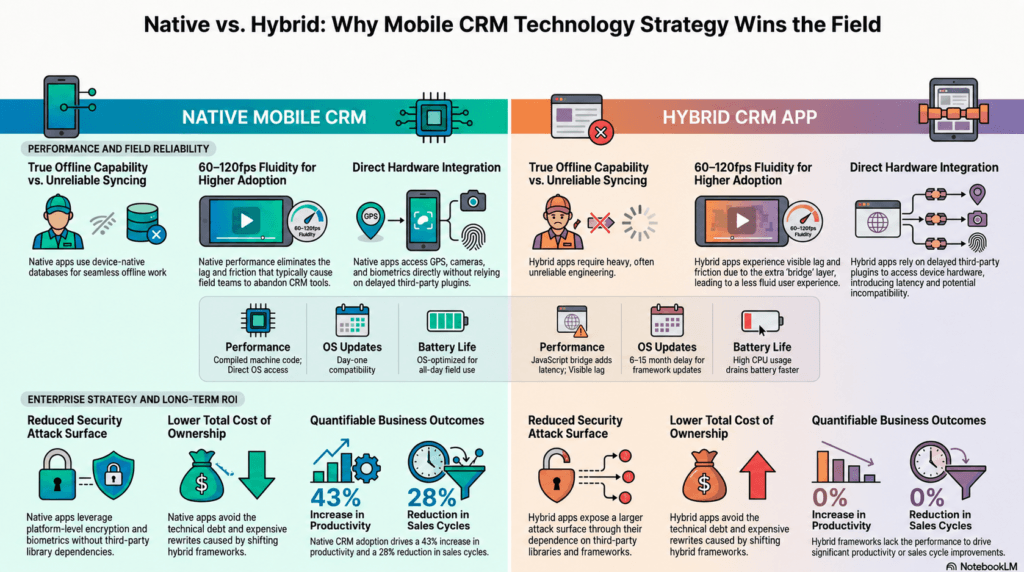
Native vs Hybrid Mobile CRM:
Why Native Wins for Field Teams
When your sales, service, and field teams use a CRM hundreds of times a week, the technology underneath it changes everything – productivity, adoption, data quality, and ultimately revenue.
What Is the Actual Difference – Native vs Hybrid?
Both types of app can look identical on a screen. The difference is in the foundation they are built on.
Built for the device
Built specifically for iOS (Swift/SwiftUI) or Android (Kotlin/Jetpack Compose). Communicates directly with the device operating system with zero intermediary layers.
Built for convenience
A web application packaged to look like a mobile app (React Native, Flutter, Ionic). Uses a bridge or virtual layer to talk to the device - like accessing a website through a mobile wrapper.
A Simple Analogy
Hybrid App
Like accessing a website packaged inside a mobile app. Familiar and functional, but with limitations built into the foundation.
Native App
Like using an application designed specifically for your phone. Everything works exactly as the platform intended - at maximum speed and reliability.
Both may look similar at first glance. But when used hundreds of times daily by sales, service, and field teams - at customer sites, while traveling, in parking lots, in areas with spotty connectivity - the difference in speed, responsiveness, reliability, and user satisfaction becomes significant.
6 Ways Native Mobile CRM Apps Outperform Hybrid
Each of these differences has a direct line to productivity, adoption, and revenue outcomes.
1. Faster Data Entry & Reduced Friction
Native apps deliver instant screen loading, smoother navigation, and faster form submissions. Small delays compound into significant lost time when teams submit dozens of updates daily.
More real-time updates. Less wasted time.2. True Offline Capability
Native apps continue functioning without internet, store data locally in device-native databases, and synchronise automatically when connectivity returns. No missed interactions.
No productivity loss in the field.3. Deep Device Integration
GPS tracking, camera capture, barcode/QR scanning, voice-to-text, push notifications, biometric auth, background sync - native apps access all of it directly, without plugin dependencies.
Faster workflows. Superior UX.4. Longer Battery Life
Native apps are compiled to machine code, optimised for the OS. Hybrid apps require extra processing layers that consume more CPU and memory - draining batteries for all-day field teams.
Better reliability for full-day field use.5. Higher Reliability & Adoption
Fewer crashes, better memory management, and 60–120fps animations. Lower user frustration is the single biggest driver of CRM adoption - and frustration is why most CRM deployments fail.
Less frustration. Higher adoption.6. Enterprise-Grade Security
Secure Enclave, Keychain/Keystore, Touch ID, Face ID, device-level encryption - all leveraged directly with no third-party dependencies, making audit and compliance certification significantly easier.
Better governance. Easier certification.Native vs Hybrid CRM App: Feature Comparison
A direct comparison across the dimensions that matter most for enterprise mobile CRM deployments.
| Dimension | ✅ Native Mobile CRM | ⚠️ Hybrid CRM App |
|---|---|---|
| Performance | ✓Compiled to machine code. Direct OS access. 60–120fps. | ✗JS bridge or web view adds latency. Noticeable lag on complex screens. |
| Offline capability | ✓Full offline with native storage and automatic sync. | ~Heavy engineering required. Often unreliable in practice. |
| Device hardware access | ✓Unrestricted access to all OS-exposed hardware APIs. | ✗Relies on third-party plugins that lag behind OS releases. |
| UX fidelity | ✓Uses platform's actual UI components. Feels exactly right. | ✗Mimics conventions. Can feel subtly 'off' to experienced users. |
| New OS feature support | ✓Available on day one of beta SDK release. | ✗Waits on framework and plugin maintainers. Often 6–12 months late. |
| Security & compliance | ✓Secure Enclave, Keychain, biometrics. Easier to certify. | ✗Each third-party library adds to the attack surface. |
| Long-term maintenance | ✓Stable as long as iOS and Android exist. Clean update path. | ✗Framework changes can force expensive rewrites. |
| Battery consumption | ✓OS-optimised. Efficient memory and background task management. | ✗Additional layers increase CPU usage and drain batteries faster. |
| 3–5 year total cost | ✓Lower technical debt. Better retention reduces hidden costs. | ✗OS updates, plugin risks, and low adoption inflate lifetime cost. |
The Hidden Risks of Hybrid CRM Apps - The Enterprise Perspective
For enterprise buyers evaluating a strategic 5–10 year CRM platform, these technology risks matter as much as the user experience.
1Dependency on Multiple Third-Party Frameworks
Hybrid applications rely on cross-platform frameworks, UI rendering engines, open-source plugins, community-maintained libraries, and third-party bridges to access device features. Every additional layer introduces another dependency.
2Slower Response to OS Updates
When Apple or Google release a major OS update, native applications can adapt immediately. Hybrid apps must wait for framework vendors, plugin maintainers, and community contributors - delays that can stretch months.
3Larger Security Attack Surface
Every third-party library becomes part of the attack surface. Key questions every enterprise should ask: Is the library actively maintained? How quickly are vulnerabilities patched? Who owns the code? Is it enterprise-grade? Many hybrid solutions depend on hundreds of open-source components.
4Abandoned Library Risk
A critical plugin becomes unsupported because its maintainer leaves or community interest fades. The application then depends on obsolete code, leaving organisations facing expensive rewrites or security vulnerabilities with no immediate fix.
5Loss of Product Roadmap Control
With hybrid platforms, organisations become dependent on framework release schedules, plugin availability, and third-party roadmap decisions. With native, the product team maintains direct control over innovation and feature delivery.
6Governance Complexity
Large enterprises face increasing scrutiny over software supply chains, open-source risks, and compliance requirements. A simpler architecture with fewer external dependencies is substantially easier to audit, govern, and certify.
7Performance Bottlenecks at Scale
Hybrid apps introduce additional layers between the application and the device - creating potential points for latency, memory issues, rendering delays, and compatibility challenges. Native apps interact directly with the OS.
Native mobile applications provide not only a superior user experience but also a more secure, sustainable, and enterprise-ready technology foundation. By minimising dependence on multiple third-party frameworks and community-maintained libraries, organisations gain greater control over security, performance, platform upgrades, and long-term product evolution. The result is lower technology risk, better governance, and a future-proof mobility strategy.
When Should You Choose Native vs Hybrid?
A practical decision framework based on your actual requirements.
| ⚠️ Consider Hybrid If... | ✅ Choose Native When... |
|---|---|
| You have a small user-base not requiring a lot of capabilities | Performance, speed, and fluidity are a top priority |
| The app is primarily a simple CRUD data display application | The app relies heavily on hardware (GPS, camera, BLE) |
| You need a quick MVP on both platforms simultaneously | Field teams will use the app intensively throughout the day |
| Platform-specific UX nuances are not critical to the use case | Offline reliability in low-connectivity environments is required |
| The app is not central to daily field operations | You are building a premium, long-term enterprise platform |
| Security, compliance, and governance requirements are high |
For a revenue operations platform used by sales, service, and field teams across an enterprise - the answer is clear. An MVP cannot deliver real revenue outcomes. This is the system your teams will use hundreds of times every working day for years - to help you achieve your revenue targets.
Why HappSales Invested in Fully Native Mobile Apps
At HappSales, we believe CRM adoption by end-users is extremely critical and that should never be compromised. That belief shaped a fundamental technology decision.
We invested in fully native mobile applications for Android and iOS. Enterprise users deserve consumer-grade experiences. Building native was the only way to deliver that without any exceptions or compromises.
"The best CRM is not the one with the most features - it is the one your teams actually love using every day."
The result: higher adoption rates, faster data capture, better visibility into pipeline and customer activity, and ultimately better revenue outcomes for our customers.
Frequently Asked Questions
Common questions from enterprise buyers evaluating native vs hybrid mobile CRM options.
A native mobile CRM app is built specifically for iOS (using Swift) or Android (using Kotlin), giving it direct access to device hardware and OS optimisations. A hybrid CRM app uses a single web-based codebase wrapped to appear as a mobile app. Native apps deliver faster performance, better offline capability, and deeper device integration. Hybrid apps are faster to build initially but compromise on user experience and long-term reliability.
Field teams update CRM records dozens of times per day, often in areas with poor connectivity. Native mobile CRM apps offer instant screen loading, true offline functionality with automatic sync, and direct access to device features. These advantages translate directly to higher user adoption and better data quality - improving forecast accuracy and revenue outcomes.
Hybrid apps rely on multiple third-party frameworks, plugins, and open-source libraries - each adding to the security attack surface. Native CRM apps leverage platform-level security such as Secure Enclave, Keychain/Keystore, Face ID, Touch ID, and device-level encryption, with a far smaller dependency footprint. This makes them significantly easier to audit and certify under enterprise security standards.
While hybrid apps have a lower initial build cost, the long-term total cost is often higher. Hybrid teams spend significant effort on OS-update compatibility, plugin maintenance, and technical debt. Add the revenue impact of poor user retention and eventual platform rebuilds, and the cost comparison typically flips within 18–24 months of deployment.
HappSales is built on fully native mobile applications for both iOS and Android. This was a deliberate strategic decision to deliver a consumer-grade experience to enterprise revenue teams - resulting in higher adoption, faster data entry, better offline reliability, and better revenue outcomes for customers.
For light use cases or simple CRUD applications, hybrid can be adequate. But for enterprise field teams - where the CRM is used intensively all day, in variable connectivity - the performance, offline reliability, and UX gaps of hybrid apps consistently lead to lower adoption. A CRM that teams avoid using provides no value regardless of its features.
See Native CRM in Action
Experience what a truly native mobile CRM feels like. Book a personalised demo and see HappSales on iOS and Android.