
Sales & Service · Unified CRM
Why Your Sales and Service Teams Shouldn't Live in Different Systems
Running sales in one tool and service in another feels normal. It is also where your revenue quietly leaks, your customers feel the gaps, and your reps burn hours on work the software should do for them.
Yes. Sales and service serve the same customer across one lifecycle. When they share one system, both teams work from the same live record. Handoffs get cleaner, response gets faster, upsell signals surface earlier, and revenue stops slipping through the cracks between disconnected tools.
Here is the uncomfortable truth most growing B2B companies discover too late: the moment your sales team and your service team start working from two different systems, you have built a wall right through the middle of your customer relationship. The customer does not see two departments. They see one company. The split is yours, and they end up paying for it in slow responses, repeated questions, and promises that fall through the gaps.
This blog breaks down exactly why that split costs you, what changes when both teams run on one all-in-one CRM for sales and service, and a practical, field-tested way to bring them together without disrupting either team.
What "one system for sales and service" really means
A unified sales and service platform is one CRM where lead management, sales, service, and account data share a single source of truth. Both teams work from the same customer timeline, so nobody re-enters data and nobody works blind to what the other team did.
A lot of vendors say "integrated." Be careful with that word. There is a real difference between two systems bolted together with a connector and one system that was built as a single platform from the start.
- Integrated, but separate: a sales tool and a service tool that sync data on a schedule. Records drift, fields do not map cleanly, and someone still owns the painful job of keeping them aligned.
- Truly unified: one platform where an account, its contacts, its deals, and its service history all live in the same place, updated in real time, visible to whoever needs them.
The goal is not "fewer logins." The goal is a single, trustworthy view of every customer. If you want the deeper definition and how it stretches across field operations too, our guide on what an all-in-one CRM is is the pillar to start with.
The hidden cost of keeping sales and service in separate systems
The cost rarely shows up as a single line item. It hides inside slow renewals, frustrated reps, and accounts that churn for reasons nobody can quite explain. Here is where it actually leaks.
Revenue leaks through the cracks
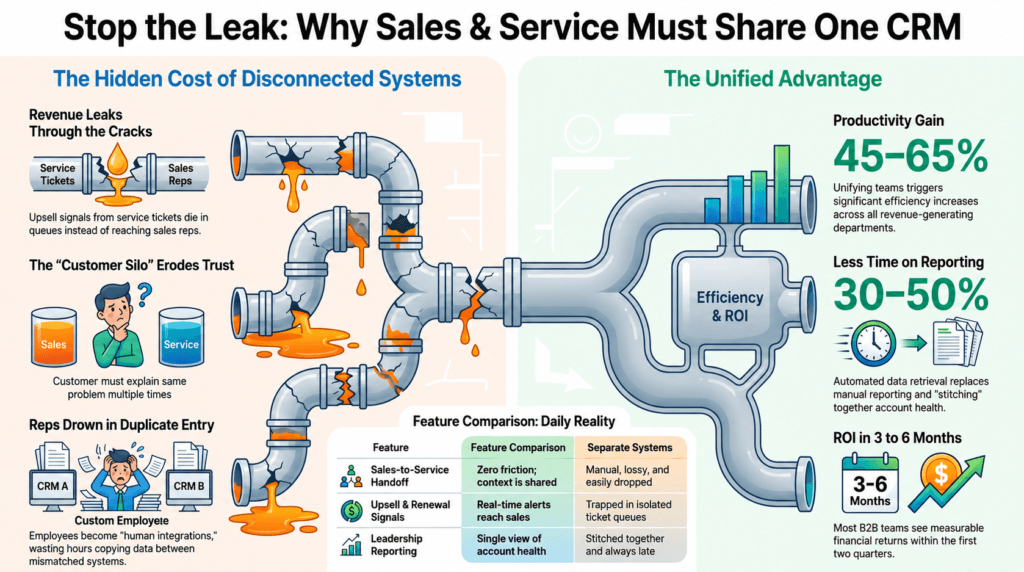
Your service team is sitting on the richest buying signals you have. A customer asking about an add-on, hitting the limits of their current plan, or filing tickets that point to a bigger need, that is upsell intent. If service lives in a different system, sales never sees it. The signal dies in a ticket queue. This is the kind of quiet leakage that a connected sales CRM is meant to prevent.
The customer feels the silo
Nothing erodes trust faster than a customer explaining the same problem twice. Sales promised something during the deal; service has no record of it. The account manager checks in to upsell on the same day a critical ticket is overdue. From the inside it looks like two teams doing their jobs. From the customer's chair it looks like one company that does not talk to itself.
Reps drown in duplicate data entry
When systems do not share data, people become the integration. Reps copy details from one screen to another, reconcile mismatched records, and rebuild context that already existed somewhere else. That is time stolen from selling and serving. Reducing exactly this kind of admin is why teams move toward AI agents for sales and service in the first place.
Leaders fly blind
You cannot manage an account you can only see in halves. With sales data in one place and service data in another, your reports never tell the whole story. Account health, renewal risk, and expansion potential all depend on seeing the full picture, which is the entire point of strong account management in a CRM.
Sales and service are one journey, not two departments
Somewhere along the way, software taught us to think of sales and service as separate worlds. The org chart agreed, and the tooling followed. But the customer never split themselves in two. They have one relationship with you that runs from first conversation to renewal and beyond.
Think about how the relationship actually flows:
- Sales wins the account and makes commitments about what the product will do.
- Onboarding and service have to deliver on exactly those commitments.
- Every service interaction either builds trust for the next deal or quietly destroys it.
- Renewals and expansion are won or lost in the service experience, long before the renewal date.
When the same record carries the deal context into service and the service context back into the account view, your customer success motion stops being a guessing game. The handoff that usually breaks things becomes a continuous line instead.
They break because context does not travel with the customer. When sales closes in one system and service starts in another, the promises, the history, and the nuance get lost in translation. One shared record removes the handoff entirely, because there is nothing to hand off.
Unified vs disconnected systems, side by side
If you only compare feature lists, every CRM looks similar. The difference shows up in the daily reality of how work actually moves. Here is the honest comparison.
| What happens day to day | One unified system | Separate sales & service systems |
|---|---|---|
| Customer record | Single live timeline for both teams | Two partial records that drift apart |
| Sales-to-service handoff | Nothing to hand off, context is shared | Manual, lossy, and easy to drop |
| Upsell & renewal signals | Service insight reaches sales in real time | Trapped in the ticket queue |
| Data entry | Entered once, used everywhere | Re-keyed and reconciled by people |
| Leadership reporting | Full account health in one view | Stitched together, always late |
| Total cost of ownership | One platform, predictable cost | Multiple licenses plus integration spend |
The pattern is consistent. Disconnected systems do not fail loudly. They tax you a little on every interaction, every day, until the total is enormous. If you are weighing options right now, our guide on how to choose a CRM walks through the questions that actually matter.
7 things that improve when both teams share one system
Here is what changes once sales and service stop living in different tools. Not theory, but the shifts you can feel within the first quarter.
- Faster response times. Service sees the full account history instantly, so resolution gets quicker and turnaround time drops.
- Cleaner renewals. Account managers walk into renewal conversations already knowing the service experience, not blindsided by it.
- More upsell, less effort. Service signals become sales opportunities automatically, instead of dying in a queue.
- Higher data quality. Enter information once and both teams trust it, which lifts adoption across the board.
- Better forecasting. When account health includes service reality, your pipeline view stops lying to you. See how this ties into sales velocity as a single performance metric.
- Lower total cost. One platform replaces a stack of tools plus the integration tax that holds them together.
- Happier teams. Reps spend their day on customers, not on copying data between screens, which is exactly the productivity story behind how a CRM increases sales.
A practical framework that works in the field
Opinion, earned the hard way: unification is not a technology project, it is an operating decision. The teams that get real value treat it as a way of working, not a software rollout. Here is the framework we have seen succeed across B2B and B2B2C revenue teams.
- Make the account the center, not the function. Stop organizing your data around "sales stuff" and "service stuff." Organize it around the account, with everything else hanging off it.
- Carry context across the handoff. Every commitment sales makes should be visible to service, and every service event should be visible to the account owner. No re-explaining, ever.
- Turn service signals into sales actions. Decide which service events mean opportunity, and route them to the right person automatically.
- Measure the account, not the silo. Track account health that blends pipeline, usage, and service reality, so renewal risk surfaces early.
- Put it in the rep's hand. Field reps and service engineers update records where the work happens, which is why a strong mobile-first CRM strategy makes or breaks unification.
See one system handle your real workflow
Watch sales, service, and account management run on a single platform with your kind of data, in a focused 30-minute live demo.
Book a demo →How an agentic AI CRM makes one system truly work
Putting both teams in one system is the foundation. What you build on top of it is where the real leverage shows up. Once sales and service data live together, AI agents can finally do useful work, because they can see the whole customer at once instead of half of it.
- Service intelligence on demand: the AI Service Analyst surfaces ticket, warranty, and AMC insights without manual reporting, so service stops digging and starts acting.
- Sales intelligence in seconds: the AI Sales Analyst answers pipeline and deal-health questions instantly, drawing on the same shared record.
- 360-degree account view: Account IQ and Opportunity IQ pull sales and service history into one intelligent snapshot of every account.
- Less typing, more selling: a voice-powered Copilot lets reps update and query records by talking, which is what finally fixes adoption.
None of this works if your data is split across two systems. AI is only as good as the context it can reach, and a unified platform is what gives it the full picture. For the service side specifically, our guide to field service management that boosts customer experience shows how this plays out on the ground.
Signs you've outgrown your disconnected setup
Not sure whether this is your problem yet? Run through this list honestly. If three or more sound familiar, the wall between your teams is already costing you.
- Customers regularly explain the same issue to more than one person.
- Your account managers are surprised by tickets they should have known about.
- Sales finds out about churn risk only after the customer has decided to leave.
- Reps copy the same data into two systems every week.
- You cannot pull a single report that shows full account health.
- Renewals feel like a scramble instead of a natural next step.
- Your "integration" needs babysitting and still breaks.
Most of these are also the classic warning signs covered in our breakdown of the top challenges in CRM implementation, because a fragmented stack and a failed rollout usually share the same root cause.
How to move to one system without the chaos
It does not have to be. Start with shared accounts and contacts, map the handoff between teams, migrate clean data first, and roll out team by team. With embedded best practices, most B2B teams go live in days to weeks, not the months a heavy enterprise project demands.
The fear of disruption keeps a lot of teams stuck in a setup they already know is failing. It does not need to be a rip-and-replace nightmare. Here is the sequence that keeps it calm.
- Unify the account and contact layer first. Get both teams pointed at one shared definition of the customer before anything else.
- Clean the data before you move it. Migrate the records you trust, archive the rest. Do not carry mess into a fresh start.
- Map the handoff explicitly. Write down what sales passes to service and what service passes back, then build the system to carry it automatically.
- Roll out by team, not big bang. Phase the rollout so each team gets comfortable, with quick wins they can feel early.
- Measure ROI from day one. Track productivity, response time, and renewal rate against your old baseline. Our guide to calculating CRM ROI gives you the model.
For the full playbook, the 7-step guide to CRM implementation covers each phase in depth. And if you want proof this works for teams like yours, our client success stories and customer reviews show what changed after they unified, in their own words.
Frequently asked questions
Why should sales and service use the same system?
Because they serve the same customer across one lifecycle. One system gives both teams a single live record, so handoffs stay clean, response gets faster, upsell signals reach sales early, and revenue stops leaking between disconnected tools.
What is the best CRM for both sales and service teams?
The best fit is a unified platform built for both from the start, not two tools connected later. Look for shared accounts, a real-time customer timeline, mobile-first capture, and AI that can see the full record. HappSales was built exactly this way for B2B revenue teams.
What happens when sales and service run on different systems?
Data fragments into silos. Reps re-enter the same information, service has no view of the deal, sales has no view of open tickets, and leaders cannot see the full account. The customer feels the gaps, and renewals quietly slip away.
Does one system for sales and service really improve revenue?
Yes. When service insight feeds sales, you catch renewals and whitespace earlier, resolve issues before they threaten the account, and shorten the path from problem to expansion. HappSales customers report measurable productivity and win-rate gains within three to six months.
Is a unified CRM expensive to run?
Usually it costs less than the stack it replaces. One platform removes duplicate licenses and the ongoing integration spend needed to keep separate tools in sync, which lowers your total cost of ownership while improving the experience for every team.
