
CRM · Sales Force Automation
Salesforce automation isn't a rival to CRM. It lives inside it.
If you've been comparing "salesforce automation software" against "CRM" as two competing purchases, you're choosing between a thing and one of its parts. Here's the relationship, drawn clearly - and what it means for what you actually buy.
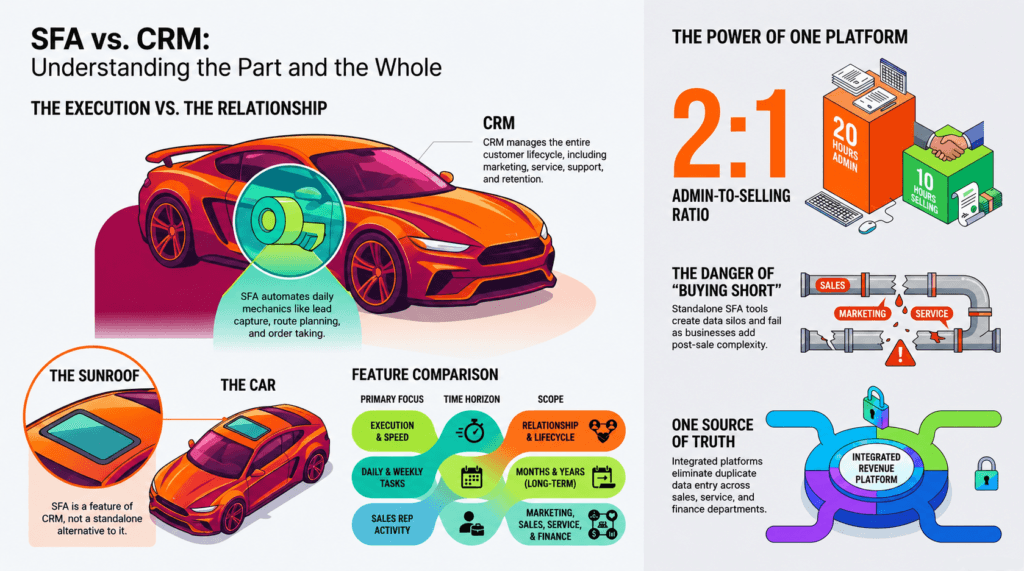
Walk into most software-buying conversations and you'll hear the question framed as a fork in the road: "Do we get a sales force automation tool, or do we get a CRM?" It's a reasonable-sounding question that rests on a wrong assumption - that these are two different categories of product competing for the same budget. They aren't. Sales force automation is a subcategory of CRM, the same way a sunroof is a feature of a car, not an alternative to one.
This confusion is everywhere, and it costs companies real money. Buyers pick a narrow standalone tool when they needed the broader system, or they bolt on a separate automation app that duplicates data their CRM was already meant to hold. The fix starts with getting the relationship right.
What "salesforce automation" actually means
Sales force automation (SFA) is the software that automates the day-to-day mechanics of selling so reps spend less time on admin and more time with customers. In practice that's a fairly defined list: capturing and assigning leads, planning visits and field routes, taking orders, logging activities, tracking the pipeline from first inquiry to closed deal, and producing forecasts and sales reports.
Industry research has long shown how lopsided a seller's week is. One widely cited 2024 analysis found reps spend only around ten hours a week actually working with customers, and nearly twice that on administrative work and data entry. SFA exists to claw back those hours - automating the busywork so the selling can happen.
Notice what that definition is centered on: execution. SFA is about doing the sales work faster, more consistently, and more visibly. It is sharply useful - and deliberately narrow.
What CRM means - and why SFA fits inside it
Customer relationship management is the broader discipline. A CRM manages the entire customer lifecycle: not just the act of selling, but the relationship that surrounds it - marketing and lead generation, service and support, account history, retention, and the long arc of growing an account profitably over years. It's the shared system of record for everyone who touches the customer, not just the sales rep.
Sales force automation is one slice of that lifecycle: the sales-execution slice. That's exactly why, across the industry, SFA capabilities are built into CRM rather than sold as the main event. As NetSuite puts it plainly, SFA features are often built directly into a CRM alongside service and marketing automation. Every SFA function is a CRM function; not every CRM function is an SFA one.
Buying "salesforce automation" instead of "CRM" is like ordering a wheel when you needed the car. You'll get something that turns - but it won't take you anywhere on its own.
Execution vs. relationship: the distinction in one table
The two aren't opposed; they operate at different scopes and time horizons. SFA optimizes the daily and weekly grind. CRM optimizes the relationship over months and years. Seeing them side by side makes the nesting obvious.
| Dimension | Sales Force Automation (the subset) | CRM (the whole) |
|---|---|---|
| Core intent | Execution - sell faster & more consistently | Relationship - grow customer value over time |
| Scope | The sales process | The full customer lifecycle |
| Time horizon | Daily & weekly activity | Months & years |
| Primary users | Sales reps & their managers | Sales, service, marketing, finance |
| Data it holds | Visits, orders, pipeline, activity | That - plus service history, preferences, retention |
| Relationship | A subcategory inside CRM - every SFA feature is a CRM feature | |
Why the "either/or" framing quietly hurts you
When sales force automation is treated as a separate purchase from CRM, two failure modes show up. The first is fragmented data: a standalone SFA app and a separate CRM mean duplicate entry, two dashboards, and a seam right where sales execution hands off to customer experience. A rep can hit every visit target - SFA looks great - while a key account quietly stops ordering, because the relationship signals lived in a different system nobody connected.
The second is buying short. A purely tactical, execution-only tool can be enough for a very early-stage team with a simple sales motion and no post-sale complexity. But the moment you add account management, service, receivables, or long B2B cycles, an execution-only tool can't reach. You've outgrown the purchase before the contract renews.
The reframe
You're not choosing between sales force automation and CRM. You're choosing how much of the customer lifecycle you want your system to cover. SFA is the floor. CRM is the building. A revenue platform is the building with the plumbing already connected.
The modern answer: CRM with embedded SFA, on one revenue platform
The market has already moved past the debate. The strongest setups don't pick SFA or CRM - they run CRM with sales force automation embedded, so the execution layer and the relationship layer share one data model instead of two disconnected ones.
That's the idea behind a revenue platform like HappSales. Sales force automation is in there - lead capture, visit and route planning, order taking, pipeline and forecast management, activity tracking - but it's stitched into the same system as lead management, field service, accounts receivable, and customer success. One record. One source of truth. No seam between "selling" and "serving."
The practical payoff:
- No duplicate data - reps log once; managers, service, and finance all see it.
- Execution and relationship visibility - a missed reorder surfaces next to a hit quota, not in a system nobody checks.
- Room to grow - the same platform that runs daily field activity also runs long B2B account management and post-sale revenue.
- AI that has the full picture - contextual next-best-action guidance only works when the data isn't split across tools.
So when a prospect tells you they're "looking for salesforce automation," they're not in a different aisle from CRM. They're describing one of the things a good CRM - and a revenue platform - already does. The right move isn't to send them to a narrower product. It's to show them the whole that their part belongs to.
Get sales force automation - without the seams
HappSales gives you SFA, CRM, and full post-sale revenue management on one platform and one data model. See how the execution layer and the relationship layer finally live together.
Book a demo → Explore the Sales CRMFrequently asked questions
Is sales force automation the same as CRM?
No. Sales force automation is a subset of CRM. CRM covers the entire customer lifecycle - marketing, sales, service, and retention - while SFA automates just the sales-execution part. Almost every modern CRM ships with SFA features built in.
Do I need a separate tool for sales force automation?
Usually not. A standalone SFA tool tends to create duplicate data entry and fragmented dashboards. A CRM or revenue platform with embedded SFA gives you the same automation plus the full customer context around it.
What does sales force automation actually do?
It automates the day-to-day work of selling: lead capture and assignment, visit and route planning, order taking, pipeline tracking, activity logging, sales forecasting, and reporting.
When is SFA alone enough?
For very early-stage teams with a simple sales motion and no post-sale complexity, execution-only SFA can be sufficient. Once you add account management, service, receivables, or long B2B sales cycles, you'll want the broader CRM scope.
Does HappSales include sales force automation?
Yes. HappSales is a revenue platform with sales force automation built in - alongside lead management, field service, accounts receivable, and customer success - all on a single data model.
